Lean CI/CD with GitHub-Actions, Fleet and Renovate
In this post, I want to describe a CI/CD (Continuous Integration/Continuous Deployment) setup I recently created. It’s really nothing special, which is perhaps exactly what makes it special to me: Its simplicity, clear architectural boundaries and reliance on mature tooling.
There are two components you need to understand before we start:
- Fleet, a GitOps integration similar to Flux or Argo
- Renovate, mostly used to automatically create Pull Requests for library or in this case container version updates
I’m hosting my own Renovate as a Kubernetes Operator, but this is very much possible with the GitHub Renovate App. It also doesn’t really matter if you use another GitOps solution - the image tags will always work the same way. I’m using Harbor as my registry but any public or selfhosted registry will do. This article assumes you have a working Kubernetes with a GitOps-Setup, as well as a working ingress and cert-issuer setup.
Overview
This is the setup we are going to build:
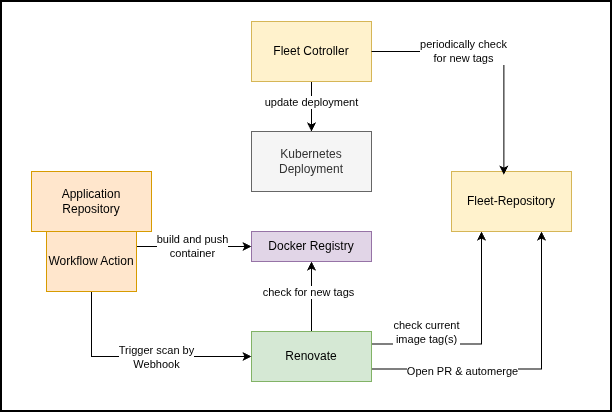
- build & push a new container
- trigger a Renovate run on a gitops repository
- update the gitops repository
- have Fleet (or other GitOps-controller) pull and deploy the changes
Preparing Renovate
For using a selfhosted Renovate, we need to both create the operator in our Kubernetes and add a job from our application repository. Because we will require a webhook endpoint to trigger a scan, after the build of the application container succeeds, we also need to enable webhooks.
Renovate Operator
The Renovate operator is installed with Helm. You can find a full values file for the Helm installation in my Infra-Ops repository. Adapt the relevant values, especially your domain and make sure to include the webhook-section.
Then install the operator like this:
kubectl create namespace renovate
    helm upgrade --install renovate \
    oci://ghcr.io/mogenius/helm-charts/renovate-operator \
    --namespace renovate \
    --values values.yaml
GitHub Access Token
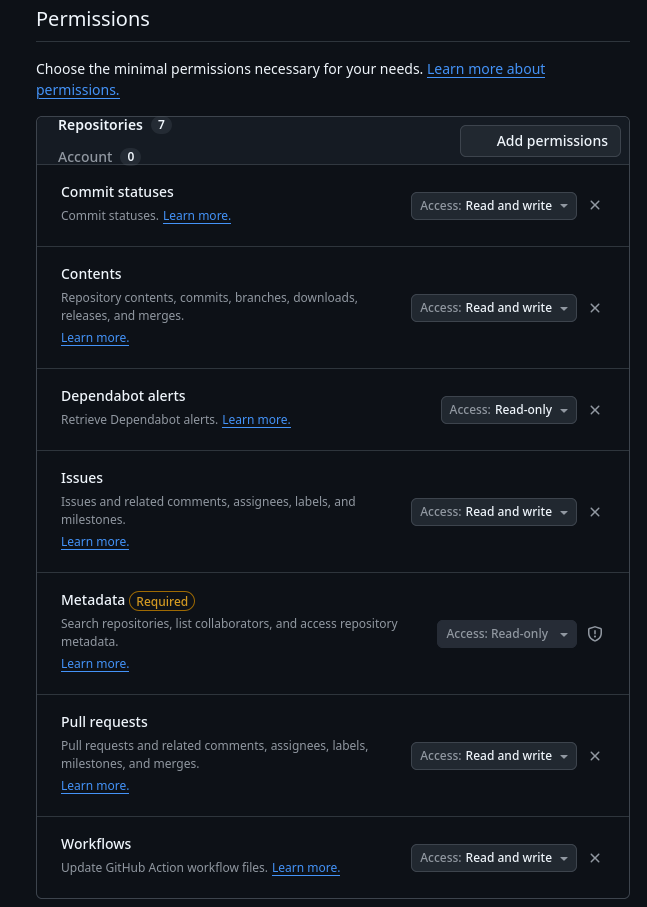
Now create a fine grained access token (assuming you are using GitHub) or access token to whatever git-service you are using. Add your GitOps-Repo with the following permissions:
- Commit Statuses -> Read/Write
- Contents -> Read/Write
- Dependabot alerts -> Read
- Issues -> Read/Write
- Pull Requests -> Read/Write
- Workflows -> Read/Write
Renovate Jobs
With the operator and CRDs in place we can now deploy the actual Renovate job. This job will read the GitOps-repository and scan for updated image tags.
apiVersion: renovate-operator.mogenius.com/v1alpha1
kind: RenovateJob
metadata:
name: <job-name> # arbitrary name
spec:
    image: renovate/renovate
provider:
    name: github # change if using something else

# schedule & parallelism are required fields #
schedule: "0 20 * * *"
parallelism: 1

# set the webhook
webhook:
    enabled: true
    authentication:
    enabled: true
    secretRef:
        name: renovate-github
        key: RENOVATE_WEBHOOK_TOKEN

discoveryFilters:
    - FAUSheppy/atlantis-fleet-ops # your repo, <github-user>/<repository-name>

# secret ref for github token
secretRef: renovate-github
This is a very minimal config, it doesn’t include OIDC-access settings or a default config, for a more complete example see my own deployment.
Create the relevant secrets:
kubectl create secret -n renovate generic renovate-github \
    --from-literal=RENOVATE_WEBHOOK_TOKEN='<secret>' \
    --from-literal=GITHUB_TOKEN='<github token>' \
    --from-literal=RENOVATE_TOKEN='<github token>'
Small but important detail here, is that the secret needs to be labeled for the operator to use it:
kubectl label secret renovate-github -n renovate renovate-operator.mogenius.com/allow-ref=true
and apply the job:
kubectl apply -n renovate -f renovate-job.yaml
You have to run repository discovery once manually (or configure a schedule and wait for it to run). To do this, open the URL/domain you configured for the operator and hit the discovery button for the newly created job.
Application Repository
I assume you already have a working Dockerfile build in your repository and that you already know the basics about GitHub workflows or the relevant counterpart in your git-server of choice. But just quickly:
name: application
on:
  push:
    branches:
    - master

jobs:
  docker:
    runs-on: ubuntu-latest
    environment:
    name: application-ci-cd

    steps:
      - name: Checkout
        uses: actions/checkout@v7

      - name: Login to Docker Registry
        uses: docker/login-action@v4
        with:
          registry: ${{ secrets.REGISTRY }}
          username: ${{ secrets.REGISTRY_USER }}
          password: ${{ secrets.REGISTRY_PASS }}

      - name: Build and push potaris next-gen
        uses: docker/build-push-action@v7
        with:
          context: .
          platforms: linux/amd64
          push: true
          # we will use this line later for tagging
          # ${{ secrets.REGISTRY }}/<project>/<image-name>:${{ steps.version.outputs.version }}
          tags: |
            ${{ secrets.REGISTRY }}/<project>/<image-name>:latest
Create the required workflow secrets in the repository settings, while you are at it, also create RENOVATE_WEBHOOK_TOKEN with the secret from before.
Now that we built and pushed the container, we still need to do two things:
- create a version tag for builds
- trigger the Renovate run
I will show you a way to create version tags automatically, but you don’t have to do this, you can also only tag it manually and then only have the new images deployed after you did so.
Autocreate/Incrementing Version Tags
To set version tags, first, on the workflow file toplevel, add a concurrency restriction and allow writing contents (because tags count as content):
permissions:
  contents: write

concurrency:
  group: application
  cancel-in-progress: false
Then add a script to determine the next version. This example will increment patch version (meaning 1.0.XXX), while respecting the latest (manually tagged) minor and major version:
- name: Determine next version
  id: version
  shell: bash
  run: |
    set -euo pipefail

    git fetch --force --tags

    LAST=$(git tag -l 'image-v*' \
      | grep -E '^image-v[0-9]+\.[0-9]+\.[0-9]+$' \
      | sed 's/^image-v//' \
      | sort -V \
      | tail -n 1 || true)

    if [ -z "$LAST" ]; then
      VERSION="1.0.0"
    else
      IFS='.' read -r MAJOR MINOR PATCH <<< "$LAST"
      VERSION="${MAJOR}.${MINOR}.$((PATCH + 1))"
    fi

    echo "version=$VERSION" >> "$GITHUB_OUTPUT"
    echo "Building image version $VERSION"
Then use the commented line from above in the push-action, to use the output from this step:
${{ secrets.REGISTRY }}/<project>/<image-name>:${{ steps.version.outputs.version }}
After the push step (because we don’t want to increment tags for failed builds/runs), add another step to persist the tag:
- name: Create Git version tag
  env:
    VERSION: ${{ steps.version.outputs.version }}
  run: |
    set -euo pipefail

    git tag "image-v${VERSION}" "$GITHUB_SHA"
    git push origin "image-v${VERSION}"
I’ve been thinking of changing this behaviour to pull the tags from the registry or something instead to avoid write permission for the action workflow.
Triggering Renovate
After the build and push is successful, we can trigger a run of our Renovate job with this simple step:
  - name: Trigger Renovate gitops repository
    env:
      RENOVATE_WEBHOOK_TOKEN: ${{ secrets.RENOVATE_WEBHOOK_TOKEN }}
      RENOVATE_WEBHOOK_URL: "<https://webhook-domain>"
    run: |
      curl --fail-with-body --show-error --silent \
        --retry 3 \
        -X POST \
        "${RENOVATE_WEBHOOK_URL}/webhook/v1/schedule?project=FAUSheppy%2Fatlantis-fleet-ops" \
        -H "Authorization: Bearer ${RENOVATE_WEBHOOK_TOKEN}"
Renovate in the GitOps-repository
Now we need to enable and configure Renovate in the target GitOps-repository via a renovate.json.
There are some caveats, but I will provide you with a full config, so it will work with any setup.
Make sure to set the correct registry in matchPackageNames.
{
    "$schema": "https://docs.renovatebot.com/renovate-schema.json",
    "extends": [
        "config:recommended"
    ],
    "kubernetes": {
        "managerFilePatterns": [
            "/\\.ya?ml$/"
        ]
    },
    "packageRules": [
        {
            "description": "<description>",
            "matchManagers": ["kubernetes"],
            "matchDatasources": ["docker"],
            "groupName": "container images",
            "automerge": false
        },
        {
            "description": "<description>",
            "matchDatasources": ["docker"],
            "matchPackageNames": [
                "/^<registry-domain>\\.<domain>\\.<tld>\\/<project>\\//"
            ],
            "versioning": "semver",
            "minimumReleaseAge": null,
            "automerge": true,
            "platformAutomerge": false,
            "ignoreTests": true
        }
    ]
}
What this config does:
- extend Renovate’s configuration preset
- define
.yamlor.ymlas Kubernetes file patterns - define package rules
- the first rule is a general matcher, which matches any registry (just for reference, you don’t need it for this setup)
- the second rule is specific to the registry and project you want to auto-merge
As for the exact options of the second rule:
- set versioning to semantic versioning
- set minimumReleaseAge to
null, as release age for our own, workflow-triggered Renovate, doesn’t make sense, if you want release age delay you should do it in the application - set platformAutomerge to
falseas we don’t want to deal with GitHub’s automerge - set ignoreTests to
truein case your Fleet repos don’t have GitHub-level tests/ci, because not having any finished CI would otherwise block the automerge
Fleet & Check the Setup
Now create and push a stub commit in the application repo and check all steps:
- Application Workflow
- docker build
- version increment
- docker push
- git tagging
- webhook trigger
- GitOps-Repository
- PR is opened
- PR is merged
- Kubernetes Fleet/GitOps-controller
- polls for changes
- redeploys bundle/pods with the new image
If everything is working you could also add renovate to your application repo to keep dependencies up to date and have a fully “auto-updating” deployment in your Kubernetes. If you need some additional examples for fleet bundles, check my fleet-ops repository.
by Yannik Schmidt
Tags: CI/CD, Kubernetes, GitOps, Renovate, Flux, Container